
Setting Up a Node
This guide walks you through setting up a Tezos node with Octez Manager.
Planning Your Setup
Section titled “Planning Your Setup”Network Selection
Section titled “Network Selection”| Network | Purpose | Recommended For |
|---|---|---|
| Shadownet | Testnet mirroring mainnet | Testing with mainnet-like conditions |
| Weeklynet | Weekly ephemeral testnet | Protocol testing |
| Mainnet | Production network | Not recommended yet (see below) |
Tip: Start with Shadownet for testing — it mirrors mainnet conditions. For faster iteration, consider a protocolnet which has shorter block times.
Warning: Octez Manager is experimental software. We recommend using it only on testnets (Shadownet, Weeklynet) until it matures. Mainnet usage is at your own risk.
History Mode
Section titled “History Mode”| Mode | Storage | Use Case |
|---|---|---|
| Rolling | ~50GB | Most users, bakers |
| Full | ~500GB+ | Block explorers, indexers |
| Archive | 4TB+ | Complete history access |
Bootstrap Method
Section titled “Bootstrap Method”| Method | Time | Description |
|---|---|---|
| Snapshot | ~30 min | Download pre-built state (recommended) |
| Genesis | Days | Sync from scratch |
Installation via TUI
Section titled “Installation via TUI”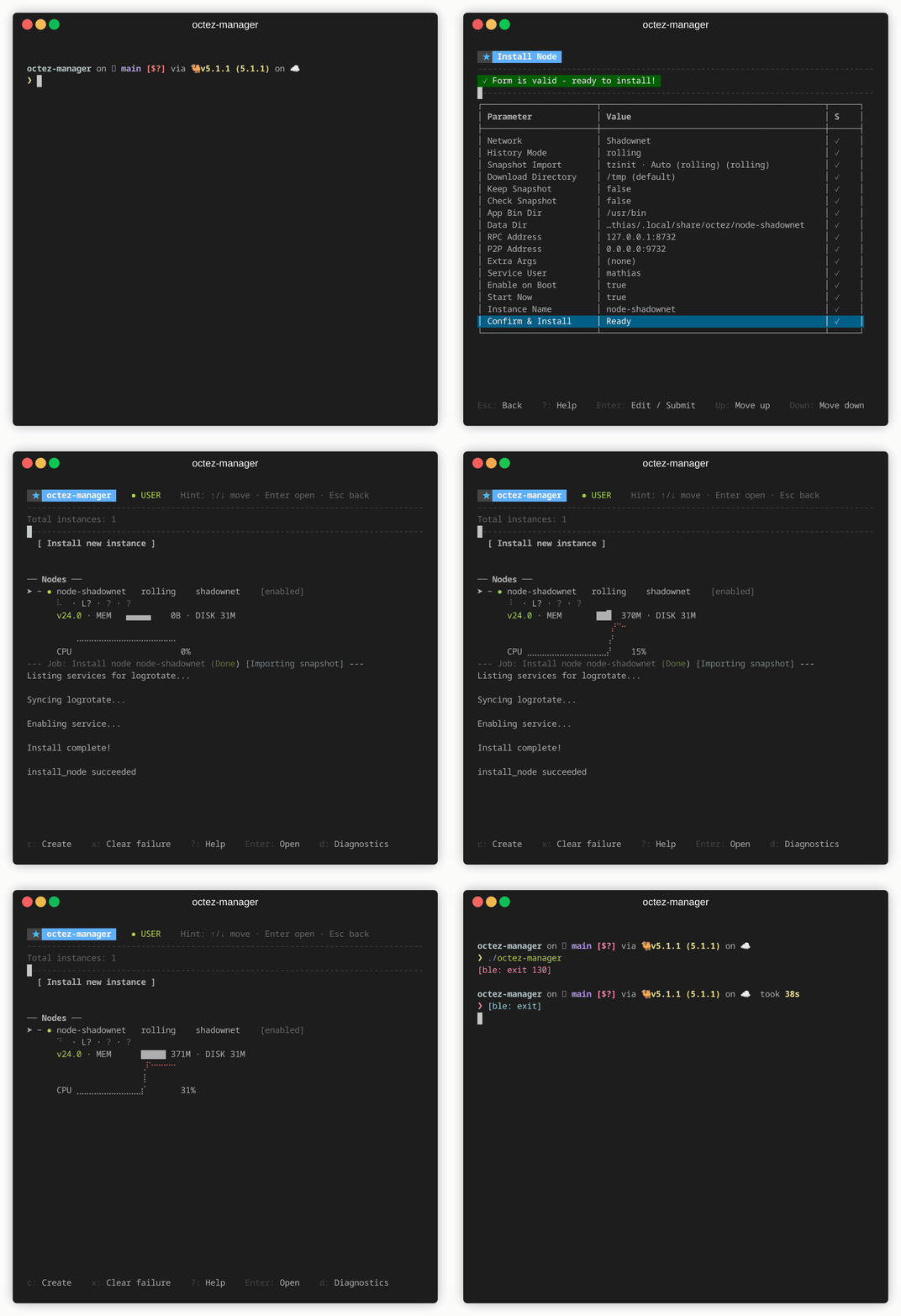
- Launch
octez-manager - Select [ Install new instance ] → Node
- Configure:
- Instance name: Unique identifier (e.g.,
shadownet) - Network:
shadownet(ormainnet/weeklynet) - History mode:
rolling(recommended) - RPC address:
127.0.0.1:8732(default) - Net address:
0.0.0.0:9732(default) - Bootstrap:
Snapshot(recommended)
- Instance name: Unique identifier (e.g.,
Installation via CLI
Section titled “Installation via CLI”octez-manager install-node \ --instance shadownet \ --network shadownet \ --history-mode rolling \ --octez-version latest \ --snapshotCustom Snapshot URL
Section titled “Custom Snapshot URL”octez-manager install-node \ --instance my-node \ --network shadownet \ --snapshot \ --snapshot-uri https://example.com/snapshot.rollingCustom Data Directory
Section titled “Custom Data Directory”octez-manager install-node \ --instance my-node \ --network shadownet \ --data-dir /mnt/fast-ssd/tezos-nodePost-Installation
Section titled “Post-Installation”Check Status
Section titled “Check Status”# Via CLIoctez-manager instance my-node show
# Via systemctlsystemctl --user status octez-node@my-nodeView Logs
Section titled “View Logs”# Via TUI: press Enter on instance, then select logs
# Via CLIoctez-manager instance my-node logs
# Via journalctljournalctl --user -u octez-node@my-node -fVerify Sync Progress
Section titled “Verify Sync Progress”curl -s http://127.0.0.1:8732/chains/main/blocks/head/header | jq .levelConfiguration Files
Section titled “Configuration Files”Octez Manager creates (in user mode):
| Path | Description |
|---|---|
~/.config/octez/instances/<name>/ | Instance configuration (node.env) |
~/.local/share/octez/<name>/ | Node data directory |
~/.config/systemd/user/octez-node@<name>.service.d/ | Systemd overrides |
In system mode (run as root):
| Path | Description |
|---|---|
/etc/octez/instances/<name>/ | Instance configuration (node.env) |
/var/lib/octez/<name>/ | Node data directory |
/etc/systemd/system/octez-node@<name>.service.d/ | Systemd overrides |
Troubleshooting
Section titled “Troubleshooting”Node won’t start
Section titled “Node won’t start”Check logs for errors:
journalctl --user -u octez-node@my-node -n 50Sync is slow
Section titled “Sync is slow”- Ensure good network connectivity
- Check disk I/O (SSD recommended)
- Consider using a snapshot if syncing from genesis
Port conflicts
Section titled “Port conflicts”Ensure ports 8732 (RPC) and 9732 (P2P) are available:
ss -tulnp | grep -E '8732|9732'