
Becoming a Baker
This guide covers setting up a baker with Octez Manager. We’ll use Shadownet as an example.
For detailed information about baking on Tezos, see the Octez documentation on running a delegate.
Prerequisites
Section titled “Prerequisites”- Running Node: A synced Tezos node (e.g., your Shadownet node). See Setting Up a Node to get started.
- Staked Tez: Minimum 6,000 tez staked to your baker address (use the faucet on testnets)
- Baker Key: Your baker’s secret key imported into the client
Set Up Baker Directory
Section titled “Set Up Baker Directory”Before installing the baker with Octez Manager, you need to create a base directory and import your baker key. This directory holds your baker’s configuration and keys.
Note: Future versions of Octez Manager may automate this setup.
# Create a base directory for your bakermkdir -p ~/.tezos-client
# Import your key (see Octez docs for details)octez-client import secret key my-baker unencrypted:edsk...
Or use a Ledger hardware wallet:
octez-client import secret key my-baker "ledger://..."See the Octez documentation for detailed instructions on key management and delegate setup.
Using a Remote Signer (Signatory)
Section titled “Using a Remote Signer (Signatory)”For enhanced security, you can use Signatory as a remote signer instead of storing keys locally. This separates key management from your baker and supports hardware security modules (HSMs) and cloud KMS backends.
For detailed Signatory setup instructions, backend options, security best practices, and troubleshooting, see the Signatory Setup Guide.
Installation via TUI
Section titled “Installation via TUI”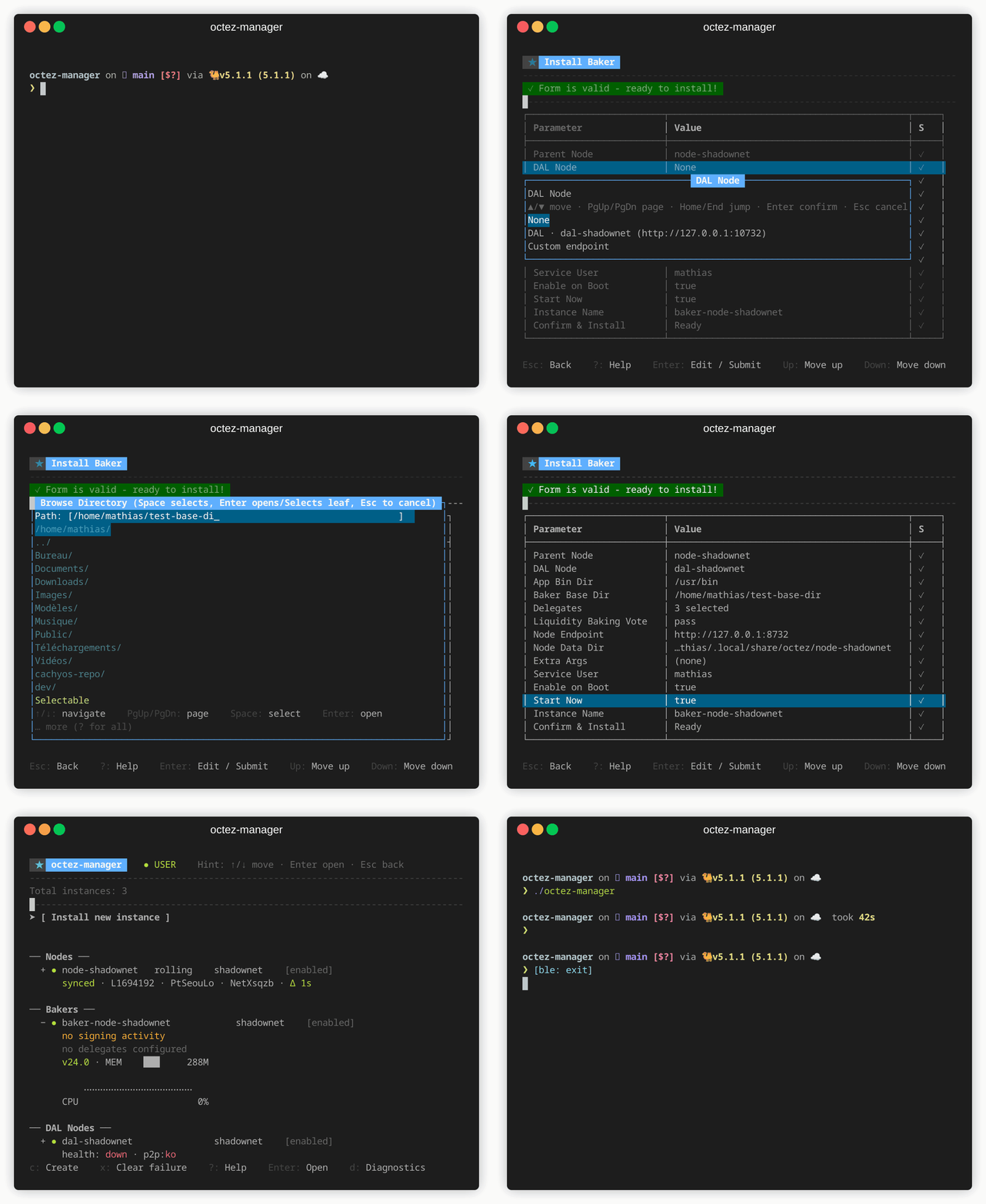
- Launch
octez-manager - Select [ Install new instance ] → Baker
- Configure:
- Node: Select your Shadownet node
- Instance name: Auto-suggested as
baker-shadownet - Delegates: Your baker address(es)
- Liquidity baking vote:
on,off, orpass - DAL node: For DAL attestations
Press
?at any time to see available actions.
Installation via CLI
Section titled “Installation via CLI”octez-manager install-baker \ --instance baker-shadownet \ --node-instance shadownet \ --delegate tz1... \ --liquidity-baking-vote passWith Remote Signer (Signatory)
Section titled “With Remote Signer (Signatory)”octez-manager install-baker \ --instance baker-shadownet \ --node-instance shadownet \ --delegate tz1... \ --liquidity-baking-vote pass \ --remote-signer dev-signerMultiple Delegates
Section titled “Multiple Delegates”octez-manager install-baker \ --instance multi-baker \ --node-instance my-node \ --delegate tz1abc... \ --delegate tz1def... \ --delegate tz1ghi...With DAL Attestations
Section titled “With DAL Attestations”octez-manager install-baker \ --instance my-baker \ --node-instance my-node \ --delegate tz1... \ --dal-endpoint my-dal-nodeLiquidity Baking Vote
Section titled “Liquidity Baking Vote”| Option | Description |
|---|---|
on | Vote to continue liquidity baking |
off | Vote to stop liquidity baking |
pass | Abstain from voting |
Monitoring
Section titled “Monitoring”Check Baker Status
Section titled “Check Baker Status”octez-manager instance my-baker showView Baking Rights
Section titled “View Baking Rights”octez-client get baking rights for tz1... --cycle <current_cycle>View Logs
Section titled “View Logs”# TUI: press Enter on instance, then select logs# CLI:octez-manager instance my-baker logsSecurity Considerations
Section titled “Security Considerations”- Key Management: Use Signatory as a remote signer with HSM/cloud KMS for production, or a Ledger hardware wallet
- Firewall: Only expose necessary ports
- Monitoring: Set up alerts for missed blocks/attestations
Troubleshooting
Section titled “Troubleshooting”Baker not producing blocks
Section titled “Baker not producing blocks”- Check node is synced
- Verify baker key is properly imported
- Check you have baking rights for current cycle
- Review baker logs for errors
Missed attestations
Section titled “Missed attestations”- Check network latency to node
- Ensure sufficient system resources
- Consider using a closer/faster node