
DAL Node Setup
The Data Availability Layer (DAL) is Tezos’s scalability solution. Running a DAL node allows your baker to attest to DAL slots. This guide uses Shadownet as an example.
Prerequisites
Section titled “Prerequisites”- Running Node: A synced Tezos node (e.g., your Shadownet node)
- Baker (optional): To attest DAL slots, you need to be a baker
Installation via TUI
Section titled “Installation via TUI”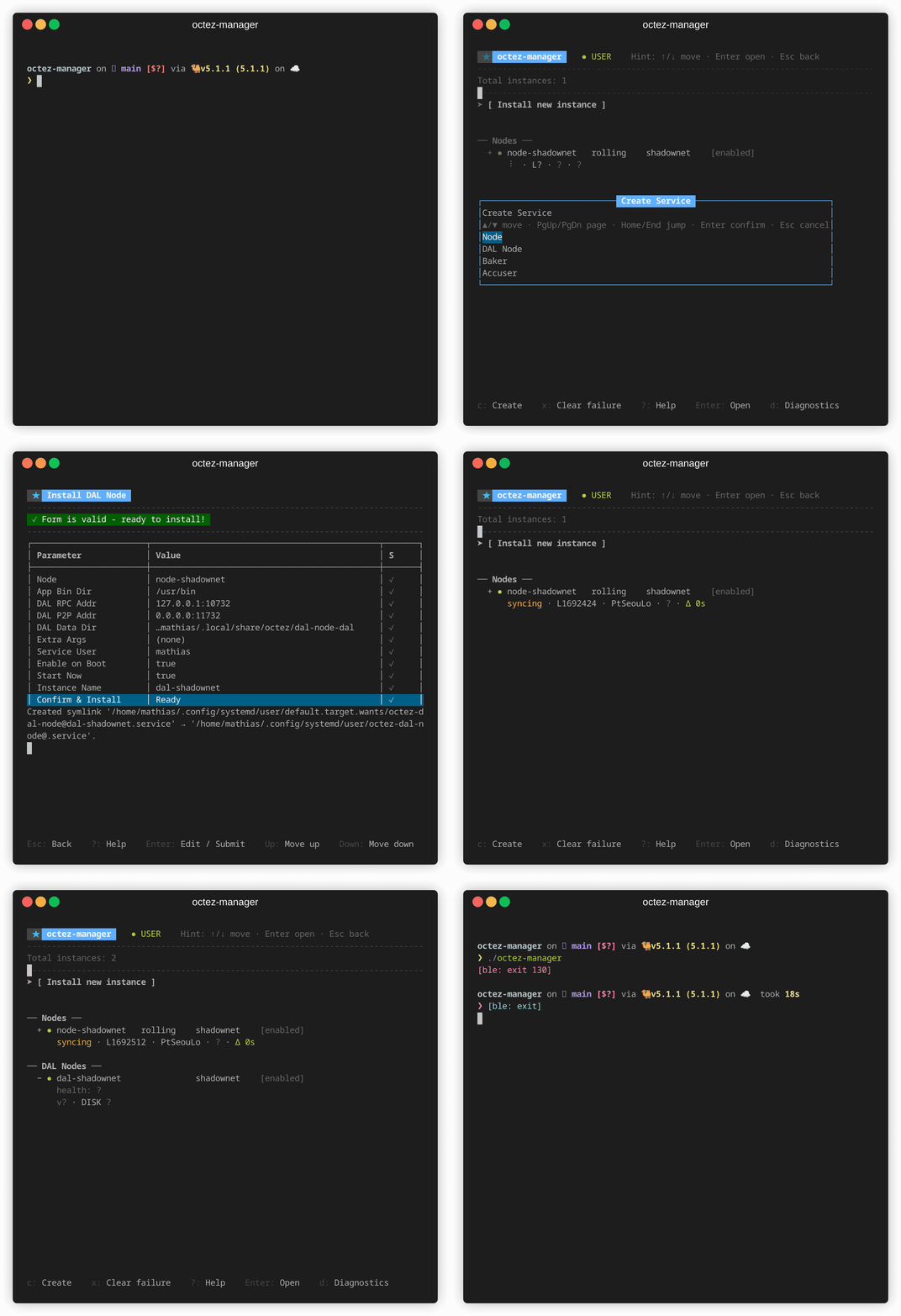
- Launch
octez-manager - Select [ Install new instance ] → DAL Node
- Configure:
- Node: Select your Shadownet node
- Instance name: Auto-suggested as
dal-shadownet - RPC address:
127.0.0.1:10732(default) - Net address:
0.0.0.0:11732(default)
Press
?at any time to see available actions.
Installation via CLI
Section titled “Installation via CLI”octez-manager install-dal-node \ --instance dal-shadownet \ --node-instance shadownetCustom Configuration
Section titled “Custom Configuration”octez-manager install-dal-node \ --instance dal-shadownet \ --node-instance shadownet \ --rpc-addr 127.0.0.1:10732 \ --net-addr 0.0.0.0:11732Using Remote Node Endpoint
Section titled “Using Remote Node Endpoint”octez-manager install-dal-node \ --instance dal-shadownet \ --node-instance http://localhost:8732Connecting Baker to DAL Node
Section titled “Connecting Baker to DAL Node”After setting up your DAL node, connect your baker to enable DAL attestations.
Edit Existing Baker
Section titled “Edit Existing Baker”In the TUI, select your baker and press e to edit, then select your DAL node.
Via CLI:
octez-manager instance baker-shadownet editDuring Baker Installation
Section titled “During Baker Installation”octez-manager install-baker \ --instance baker-shadownet \ --node-instance shadownet \ --delegate tz1... \ --dal-endpoint dal-shadownet \ --liquidity-baking-vote pass| Port | Protocol | Purpose |
|---|---|---|
| 10732 | HTTP | RPC interface |
| 11732 | TCP | P2P network |
Ensure these ports are accessible for DAL network participation.
Monitoring
Section titled “Monitoring”Check Status
Section titled “Check Status”octez-manager instance dal-shadownet showView Logs
Section titled “View Logs”# TUI: press Enter on instance, then select logs# CLI:octez-manager instance dal-shadownet logsCheck DAL Node RPC
Section titled “Check DAL Node RPC”curl -s http://127.0.0.1:10732/healthTroubleshooting
Section titled “Troubleshooting”DAL node not syncing
Section titled “DAL node not syncing”- Verify the L1 node is fully synced
- Check network connectivity on port 11732
- Review logs for peer connection issues
Baker not attesting DAL slots
Section titled “Baker not attesting DAL slots”- Verify DAL node is running and synced
- Check baker configuration includes DAL node
- Restart baker after DAL node configuration changes