
Becoming a Baker
This guide covers setting up a baker with Octez Manager. We’ll use Shadownet as an example.
For detailed information about baking on Tezos, see the Octez documentation on running a delegate.
Prerequisites
Section titled “Prerequisites”- Octez Binaries: Install the Octez suite (
octez-client,octez-baker, etc.). See How to get Octez for installation options. - Running Node: A synced Tezos node (e.g., your Shadownet node)
- Staked Tez: Minimum 6,000 tez staked to your baker address (use the faucet on testnets)
- Baker Key: Your baker’s secret key imported into the client
Set Up Baker Directory
Section titled “Set Up Baker Directory”Before installing the baker with Octez Manager, you need to create a base directory and import your baker key. This directory holds your baker’s configuration and keys.
Note: Future versions of Octez Manager may automate this setup.
# Create a base directory for your bakermkdir -p ~/.tezos-client
# Import your key (see Octez docs for details)octez-client import secret key my-baker unencrypted:edsk...
Or use a Ledger hardware wallet:
octez-client import secret key my-baker "ledger://..."See the Octez documentation for detailed instructions on key management and delegate setup.
Installation via TUI
Section titled “Installation via TUI”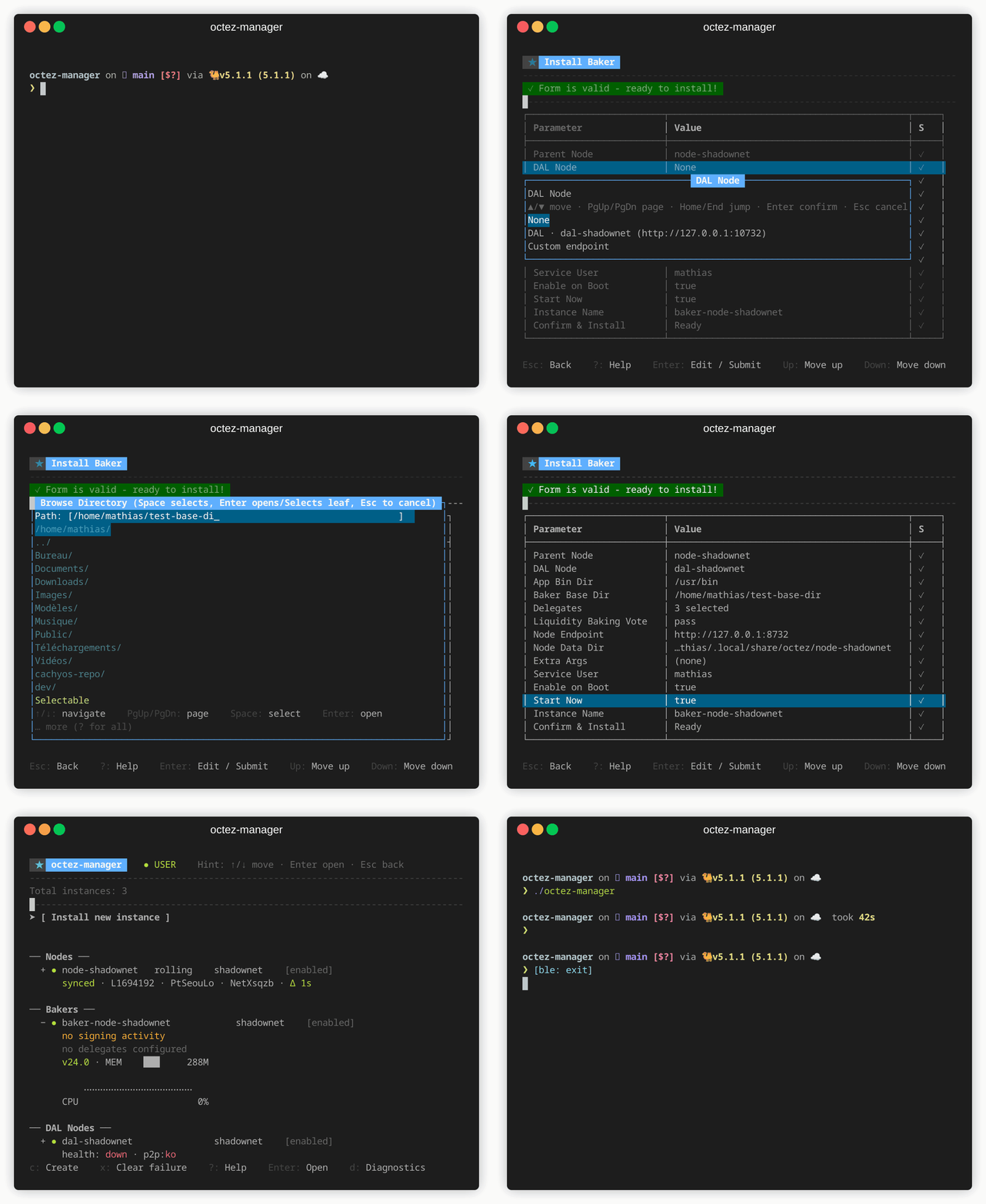
- Launch
octez-manager - Select [ Install new instance ] → Baker
- Configure:
- Node: Select your Shadownet node
- Instance name: Auto-suggested as
baker-shadownet - Delegates: Your baker address(es)
- Liquidity baking vote:
on,off, orpass - DAL node: For DAL attestations
Press
?at any time to see available actions.
Installation via CLI
Section titled “Installation via CLI”octez-manager install-baker \ --instance baker-shadownet \ --node-instance shadownet \ --delegate tz1... \ --liquidity-baking-vote passMultiple Delegates
Section titled “Multiple Delegates”octez-manager install-baker \ --instance multi-baker \ --node-instance my-node \ --delegate tz1abc... \ --delegate tz1def... \ --delegate tz1ghi...With DAL Attestations
Section titled “With DAL Attestations”octez-manager install-baker \ --instance my-baker \ --node-instance my-node \ --delegate tz1... \ --dal-endpoint my-dal-nodeLiquidity Baking Vote
Section titled “Liquidity Baking Vote”| Option | Description |
|---|---|
on | Vote to continue liquidity baking |
off | Vote to stop liquidity baking |
pass | Abstain from voting |
Monitoring
Section titled “Monitoring”Check Baker Status
Section titled “Check Baker Status”octez-manager instance my-baker showView Baking Rights
Section titled “View Baking Rights”octez-client get baking rights for tz1... --cycle <current_cycle>View Logs
Section titled “View Logs”# TUI: press Enter on instance, then select logs# CLI:octez-manager instance my-baker logsSecurity Considerations
Section titled “Security Considerations”- Key Management: Consider using a remote signer or Ledger hardware wallet
- Firewall: Only expose necessary ports
- Monitoring: Set up alerts for missed blocks/attestations
Troubleshooting
Section titled “Troubleshooting”Baker not producing blocks
Section titled “Baker not producing blocks”- Check node is synced
- Verify baker key is properly imported
- Check you have baking rights for current cycle
- Review baker logs for errors
Missed attestations
Section titled “Missed attestations”- Check network latency to node
- Ensure sufficient system resources
- Consider using a closer/faster node